Keyboard Shortcuts
Table of Contents
Starting with Ventuz Director V4.05, keyboard shortcuts can be customized by the user. The short cut manager can be found in the main menu under Tools / Shortcuts. The shortcut layout is stored in the user settings on a machine. To transfer a layout to other users and/or machines, use the export and import buttons.
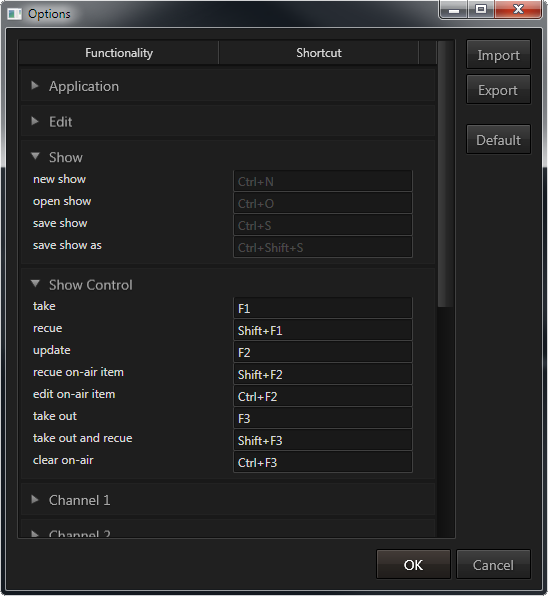
The list below shows the most important default keyboard shortcuts. To reset a shortcut layout, use the "default" button.
Application
| Key | Description |
|---|---|
| Ctrl + A | Select all items on timeline |
| Ctrl + D | Deselect all items on timeline |
| Ctrl + N | Create new show |
| Ctrl + O | Open existing show |
| Ctrl + S | Save current show |
| Ctrl + Shift + S | Save As current show |
| Ctrl + 1 (...9) | Make channel 1 listen to user operations (take keys, cue, ...) |
| Alt + F4 | Exit application |
| Ctrl + Alt + + | Activate next window layout |
| Ctrl + Alt + - | Activate previous window layout |
| F11 | Cycle fullscreen modes |
| F11 + Shift | Cycle fullscreen modes (reversed) |
| + (on number pad) | Open ShotBox |
Transport Control
| Key | Description |
|---|---|
| F1 | Take |
| F1 + Shift | Take and cue duplicate |
| F2 | Update |
| F2 + Ctrl | Toggle on-air editing mode |
| F2 + Shift | Cue duplicate of on-air item |
| F3 | Take Out |
| F3 + Ctrl | Clear |
| F3 + Shift | Take out and cue duplicate |
| F5 | Start show |
| F5 + Ctrl | Pause show |
| F6 | Rewind |
| F7 | Forward |
| F8 | Jump to start of show |
| F8 + Ctrl | Jump to end of show |