Project Documentation
In order to keep a project on its tracks when working with it over longer time it is advised to write project documentation describing the project in more detail, or including guidelines so your colleagues and future you know what to do.
With Ventuz 8, we have introduced the ability to write your documentation in HTML or Markdown and have it displayed inside of Ventuz. We have implemented Markdig https://github.com/xoofx/markdig. The following section will show you how to do so.
Creating Documentation
After you've created your project, some documents are automatically created and updated each time you close your project. You will find a Documentation folder in your project file structure where a project report has been created. If thats not case you can create the folder yourself.
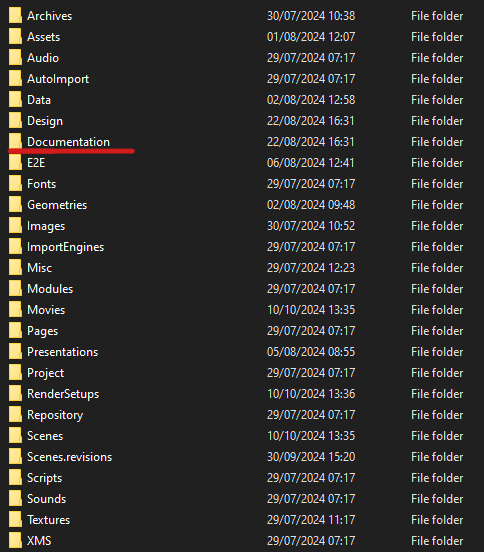
Inside this folder you will need to create a index.md file. This can then be edited by your favourite text editor. We recommend notepad++. After you created the file and your Designer is running with that project you will see that a index.html is created automatically. If you Designer is not running it will be created as soon as you open that project. The html is needed so we can actually display it inside the Designer.
While Markdown is widely used, it, sadly, is not standardized; therefore, searching the web for specific syntax might not work for you. Thats why we provide a list of syntax that works here.
List of markdown syntax that works: Try copying this into your index.md file to see how this works for you.
# General !MarkDown Syntax
horizontal lines:
____
----
normal Text
*italics*
**bold**
***bold italics***
~~deleted~~
++Inserted text++
==Marked text==
H~2~O is a liquid. 2^10^ is 1024
Warnings:
> [!Warning]
> This will produce a warning sign above the text Caution, note and info also produce different emojis
# Links
auto links: https://www.ventuz.com
link (anchor) to [H1 Header]
# H1 Header
Plain Text
## H2 Header
Plain Text
### H3 Header
Plain Text
# Quotes
> quote line 1
> quote line 2
> quote line 3
# Lists
1. ordered list
1. ordered list
continued text of item 1
$ indented code block line 1
$ indented code block line 2
continued text of item 1
1. ordered list
a. ordered list
a. ordered list
a. ordered list
a. ordered list
* unordered list
second paragraph
* unordered list
* unordered list
*
* unordered list
*
*
# Task lists
- [ ] Task 1
- [x] Task 2
- [ ] Task 3
\# is escaped
# Heading with style
Setext headings Foo *bar*
=========
Setext headings Foo ***bar***
---------
# Code Blocks
a simple
indented code block
fenced code block
~~~
fenced code block line 1
fenced code block line 2
~~~
Inline `code` is written like this.
# Pipe tables
header a | header b
- | -
item 0 | item 1
item 2 | item 3
# Grid Tables
+---------+---------+
| Header | Header |
| Column1 | Column2 |
+=========+=========+
| 1. ab | > This is a quote
| 2. cde | > For the second column
| 3. f |
+---------+---------+
| Second row spanning
| on two columns
+---------+---------+
| Back | |
| to | |
| one | |
| column | |
# YouTube

# Footnotes
Here is a footnote[^1]. And another one[^2]. And a third one[^3]. And a fourth[^4].
[^1]: Footnote 1 text
[^2]: Footnote 2 text
# abbrevations
Use abbrevations for complex words like VMS
*[VMS]: Ventuz Machine Service
# Images
embedded data: url

remote from https://www.ventuz.com/wp-content/uploads/2019/10/ventuz-logo-weiss-300x86.png?x10618

remote via HTML with size
<img src="https://www.ventuz.com/wp-content/uploads/2019/10/ventuz-logo-weiss-300x86.png?x10618" width="200"/>
centering a image
<p style="text-align:center;"><img src="bgd1.png"></p>
local file kjhlkjh

You can also put the [link URL][1] below the current paragraph
like [this][2] and reference the same embedded image ![image][img1] multiple times ![image][img1]
[1]: http://url
[2]: http://another.url "A funky title"
[img1]: data:image/png;base64,iVBORw0KGgoAAAANSUhEUgAAACQAAAAkCAYAAADhAJiYAAAAAXNSR0IArs4c6QAAAARnQU1BAACxjwv8YQUAAAAJcEhZcwAADsMAAA7DAcdvqGQAAAYWSURBVFhH7Zjdb1t3Gcc/x+9JnHRJmpc2SdeEibE0a1nZpA4xmBhaBxKT2BASfwBbJSSEuOKC+11xiTRp0rhB3FRMQKFb1zVp1rT0xUlJ1q7N6iROvMR27Dh+P+f4vPEcx7tMYjsa7ILHsmwfH5/f9zzf7/d5Hv+U5eVVh69QeOqvX5k4ECDHcSiXy2xsbFAsFqlWq7VjB4kDAVIUha30Q0r5ORKJDQFXwrKs+retxYEAqapKe1uSpyaqrK5GyWa3JUv6gbJ0IECpZJyOcIpjx3oJBnNsbqaoVNT/DSDbttG1VcZGAzi2wciILVmKUSoVMU2zflbz0TKgQqFAf986xYLK7NQUJ8b9Iqoi+Xy+Ju5Wo2VAyUSUkeFtbtxMcv4vn9EXLjE07CWdTte01aq4WwLkLnaoPUa43eajKxvcuFNm9eEaz5wKidsSNdr+q4BSqSSdnUuSjTKzcxkyRQ/TU3GODWp0dek1OlulrSVAaumBiHiJi+8nyGQqOB4vV65uEnRKjI1ZAjhVo80VfrPRNCBN0wj5bhP0Fbh0OYlhWng9FvdjNpGZFZ76OiLsdK1ItuK2pgGtr8cZHV7g3j2VWLyC32uL7S1UScbMTJyvHdXo6CiwvZ1ribbmKTPmBMQWd25r/PLNPE9+Q7LgWPz6XBbV2CKxkmTipF3TWStuawqQW2Mea59Dkfd/Om9g66bUH4PBAZ2hQYPJm7BwN8n4qEaxtEPblwpoe2tJ6s0nTE9Xub9ocPWah/ExjZe+U2F+3sO9lQDTHyc5HM4zcjRHLtc8bQ0Dcu/ULN1hsCfH3z+oYgtNc/NeekNlfvzdIpMzQQIBh+tzKonldY4PC30ylrgmaCZLDQPKZrMM99xk8aHFrbs2QVk8lvASiXh59KnCwqKfgM9kNQPv/3ON8SfjYntpLcXClwNoK7lA2PcZl6Zs1lM2Pq/F95/TmJ4N8da7XbxwSqW700Qz4MKU1CY1zpHBZXGbO5I0TltDgNx60um5iUfTuTBp4chD+j2vnynR5rckU/CTb+VFXwbut/OLcPuWxqmJNTYS6025rSFAqcQa7VqE2QWbT6I2fp/oyXTQCg7ffNzg7LO6VGlb9GLjUSxyFYWLlw3C3jTtgWWZkcoNF8mGAJU25+hRlnnvIymAVTc7Dpa0BUNzGGiTWeiQUSsFpuXU2oVf9DV53aJa1BkdjMrgttkwbfsCcu8ukL/GZtrhxj03AzvDvSKU+XwOlxb8/HEyyLZkKyC6siw5xyM621Skv2kcGYiJIeINu21fQJ+vRQlbC3wszlpNOSJmUVBtRHVY3fYg85m8tVnKeCnpO0DdVmJKK7lwyaS/JyvuW2x4JNkXkJO5hZ1NczniiA7cI7Ys6qCLm85fD3DmhElft80fPmhjLa3gVcwabR6Pw90HEL1vMC6TgVvlG9HRnoCKMteweYsNoSuy5BD072THfbqiDgZsvndap1MGNUM+u8dte0dHrrgTGYcPp00GDscwqhm8Xm/9yrvHnoDyqSh26t/87Y5BNq8JFTt3uKMhV9gOWV1BFzErQpsL5gtQLkDdcLgq4iafY6h3Rf6ZBGu/3yv2BJR+dJV2RWfs6Rc5+dzzUmN8ogV3zrFqWXCtpcga7sK6OM495jqtJLOITzL0w2cdfvEjhcf7FELmbTS1XL/y7rErIJdvdelfWKrJq0+UeftXZ3jrd+f4wctn8Yc6hAJdnFMh0GYyftzglRdM/H5X0A4vP+Pw+3Pwzm8VXj/rpZB3KGQlp9L/9otddz9cRzyKXCEZ+TNWfIaxAWmkx05g9J1msdTHX6ejMr4u85s3shzuzBOLqly46OPFcYWXTisM9krJEIaXMv2Uu39K/9hrhLv66lffPfbdjjEMg5WFa6xHzuOsTHK026K3/yiB489TDo2gWpIl/yPaqp8S1kp0+lyBQ7zSRbnnVQ6N/YwjQ6P1q+0fDe8PuRlbeRAhMfse+sMP6Q5m6T0UItAelsqMTJFSiaUwpiptmIOv8NjEzxkanaj/uvFoacNqeXGe1N1/kIvNECqn8PhE3R29hEdO0vv0axwf/3b9zObj/ztoewf8B5T1lrFRWNEQAAAAAElFTkSuQmCC "My Image"
# Diagrams (mermaid)
Mermaid Diagramming and charting tool
https://mermaid.js.org/
## graph
```mermaid
graph TD;
A-->B;
A-->C;
B-->D;
C-->D;
```
## sequenceDiagram
```mermaid
sequenceDiagram
loop Daily query
Alice->>Bob: Hello Bob, how are you?
alt is sick
Bob->>Alice: Not so good :(
else is well
Bob->>Alice: Feeling fresh like a daisy
end
opt Extra response
Bob->>Alice: Thanks for asking
end
end
```
## Pie Chart
```mermaid
pie title What Voldemort doesn't have?
"FRIENDS" : 2
"FAMILY" : 3
"NOSE" : 45
```