Shortcuts
Table of Contents
Starting with Ventuz Director V5.4, the shortcut manager was revamped to allow i.e. multiple keys per command. The shortcut manager can be found in the main menu under Tools / Shortcuts. The shortcut layout is stored in the user settings on a machine. To transfer a layout to other users and/or machines, use the export and import buttons.
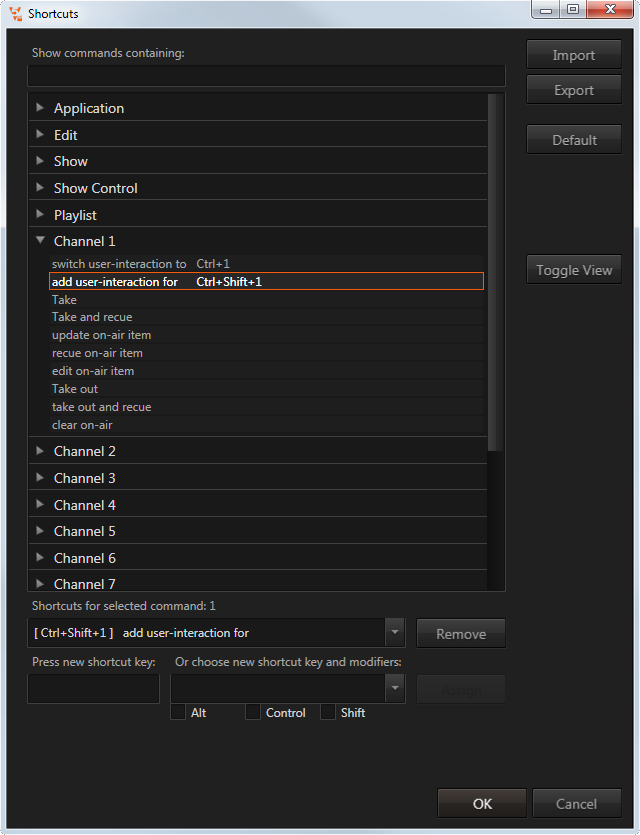
The list below shows the most important default keyboard shortcuts. To reset a shortcut layout, use the "default" button.
Default Shortcuts
Director comes with a default set of shortcuts for the most common commands, most of them can be remapped, but some are uneditable and marked with X in the following tables.
Actions that can not be remapped are grayed out.
Application
| Key | Search Term | Description | Editable |
|---|---|---|---|
| Ctrl + N | show | Create new show | 
|
| Ctrl + O | show | Open existing show |
|
| Ctrl + S | show | Save current show |
|
| Ctrl + Shift + S | show | Save As current show |
|
| Ctrl + 1 (...9) | channel | Make channel 1 listen to user operations (take keys, cue, ...) | 
|
| Alt + F4 | application | Exit application |
|
| Ctrl + Alt + + | view | Activate next window layout |
|
| Ctrl + Alt + - | view | Activate previous window layout |
|
| F11 | view | Cycle fullscreen modes |
|
| F11 + Shift | view | Cycle fullscreen modes (reversed) |
|
| + (on number pad) | shotbox | Open ShotBox |
|
Edit
| Key | Search Term | Description | Editable |
|---|---|---|---|
| Ctrl + C | edit | Copy |
|
| Ctrl + V | edit | Paste |
|
| Ctrl + X | edit | Cut |
|
| Ctrl + Z | edit | Undo |
|
| Ctrl + Y | edit | Redo |
|
Global Show Control
| Key | Search Term | Description | Editable |
|---|---|---|---|
| F1 | showcontrol | Take |
|
| F1 + Shift | showcontrol | Take and cue duplicate |
|
| F2 | showcontrol | Update |
|
| F2 + Ctrl | showcontrol | Toggle on-air editing mode |
|
| F2 + Shift | showcontrol | Cue duplicate of on-air item |
|
| F3 | showcontrol | Take Out |
|
| F3 + Ctrl | showcontrol | Clear |
|
| F3 + Shift | showcontrol | Take out and cue duplicate |
|
Timeline
| Key | Search Term | Description | Editable |
|---|---|---|---|
| F5 | timeline | Play |
|
| F5 + Ctrl | timeline | Pause |
|
| F6 | timeline | Rewind |
|
| F7 | timeline | Forward |
|
| F8 | timeline | Jump to start |
|
| F8 + Ctrl | timeline | Jump to end |
|
| Ctrl + A | timeline | Select all items on timeline |
|
| Ctrl + D | timeline | Deselect all items on timeline |
|
Playlist
| Key | Search Term | Description | Editable |
|---|---|---|---|
| F4 | playlist | Restart playlist |
|
| Ctrl + Shift + Up | playlist | Move all selected items one row up |
|
| Ctrl + Shift + Down | playlist | Move all selected items one row down |
|
| Alt + Ctrl + Shift + Up | playlist | Move all selected items to the top of the playlist |
|
| Alt + Ctrl + Shift + Bottom | playlist | Move all selected items to the bottom of the playlist |
|
| Ctrl + A | playlist | Select all playlist items |
|
| Delete | playlist | Delete selected items |
|
Assign Keys
Every command can handle up to 3 triggers. To assign a new trigger to a command simply follow the follwing steps:
- select a command in the list
- either assign a key by pressing it on your keyboard
- or choose the key and modifier from a list of keys
- press Assign
Keys that are not on your keyboard can be assigned through the provided list
Assign GPIs
To assign a GPI trigger follow the steps above and select VTZ_GPI_Pxx from the provided key list.
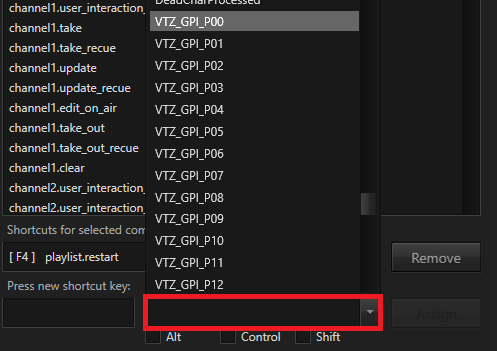
The GPI configuration and the assignment of the pins is documented here.
Remove Keys/GPIs
To remove a key or GPI from a command follow these steps:
- select a command from the list
- select one of the assigned keys/GPIs
- press Remove