How To use Stream Out
Introduction
The Encoded Stream Out outputs provide a realtime, low latency encoded video output using either h.264 or HEVC that you can send to a variety of destinations. Ventuz provides SRT streaming and a browser based solution out of the box, and additionally you can expand its capabilities by either using our plugin for the popular GStreamer framework, or the pipe or Web socket based API.
Additionally Encoded Stream Out outputs support keyboard, mouse and touch input, depending on the respective client's capabilities.
This How To will teach you how to configure and use the Stream Out output in different scenarios.
Configuration
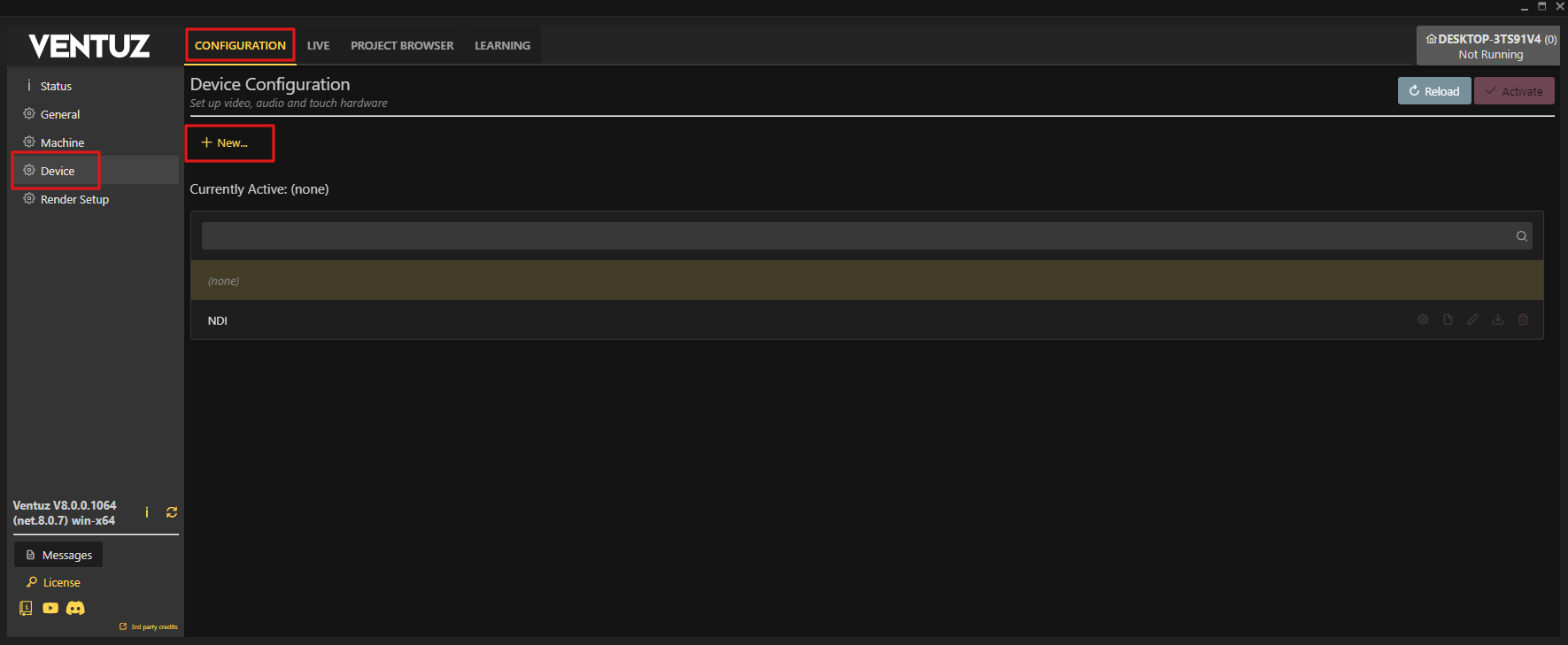
To use Stream Out we need to create a Device Configuration for it. Head to the configuration tab inside the launcher or configuration editor and create a new device configuration.
After naming and creating your configuration add a Stream Out to the right output side via drag and drop.
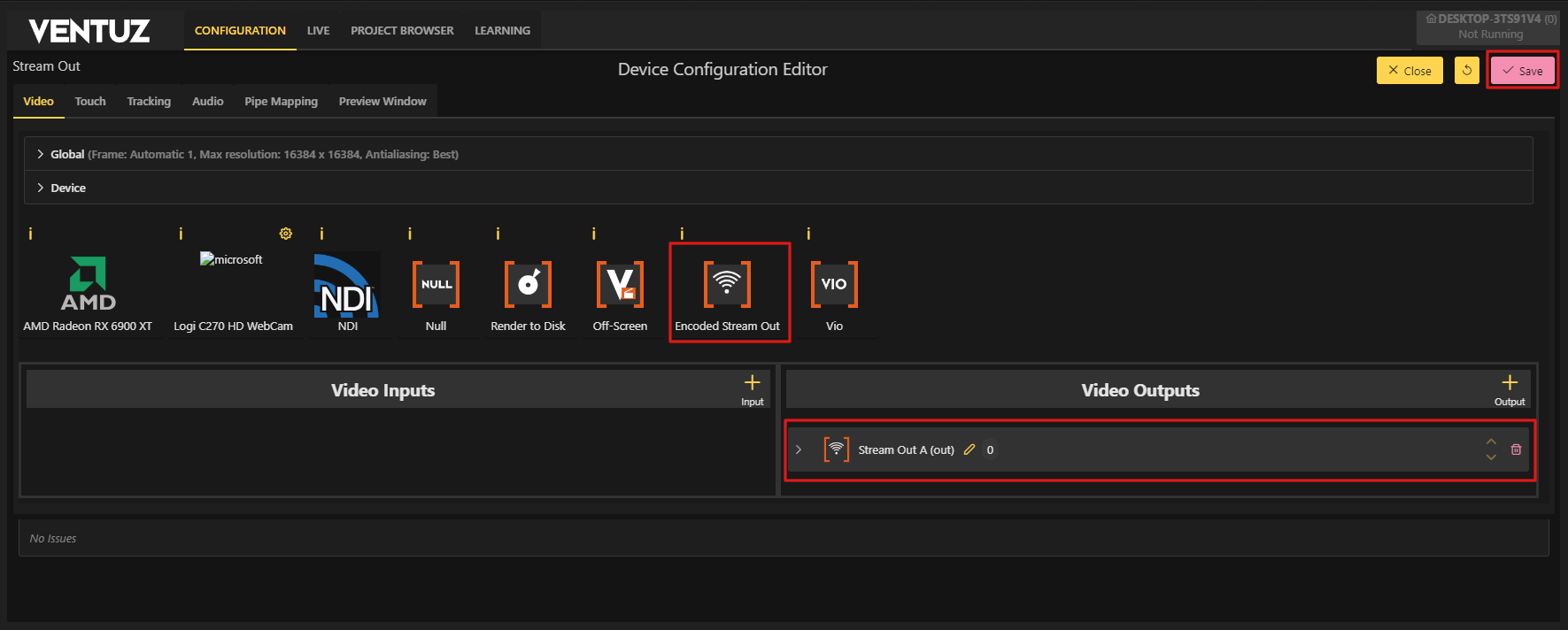
The properties of this output type differ a few ways from other output types.
Codec (NVIDIA GPUs only)
- You can choose between h.264 and HEVC (h.265); non-NVIDIA GPUs only support h.264. Please note that pre-Blackwell GPUs (older than RTX 50x0) can't encode h.264 in 10 bit color depth so if you want to output in HDR or wide color on those GPUs, HEVC is preferred.
Color Sampling (NVIDIA GPUs only)
- Depending on the GPU you can choose between 4:2:0 (default), 4:4:4 (NVIDIA Maxwell / GeForce 9x0 and later) and 4:2:2 (NVIDIA Blackwell / RTX 50x0 and later). Note that subsampling other than 4:2:0 might not be supported on the receiving side, so use with caution.
SRT Audio Codec:
- None: No audio
- MPEG-2 Layer 2 (384 kbits/s, default)
- MP3 (320 kbit/s)
- Opus (256 kbits/s, best quality and latency)
Note that this doesn't affect the rest of the Stream Out API; that one still always gets PCM.
SRT output URI
- described below
Encode Mode:
- Low Latency
- Uses the lowest latency possible (<0.5 frames usually). This mode uses more GPU resources. This is best used in local scenarios with some internet activity.
- Streaming
- Gives you a slightly better output quality at the cost of a higher latency. Best used for any situation where you stream to the internet.
Rate Control Mode:
- Constant QP
- The codec will always opt for a higher quality, disregarding the bitrate needed for it.
- Constant Bitrate
- Forces the codec to get the best quality possible with the bitrate limit set
Bitrate:
- Sets the maximum bitrate the codec can use. This value is only used when the Constant Bitrate mode is used, otherwise this value is ignored.
Constant QP:
- sets the overall quality level when the Constant QP mode is active. Otherwise this will be ignored. 0 = Nearly lossless and 51 = lowest quality. Usually a value around 20 is advised for a balance of performance and quality.
If you need detailed information about the other properties available on this output, take a look here
Previously when using this mode, the stream is not sent anywhere by default. These settings are usually needed to enable your own custom program with your own tools to catch or use this stream via our Ventuz Stream Out API.
In Version 8.1, we provide several ways to do this:
Stream out viewer
Ventuz comes with a web based viewer for Stream Out outputs with low latency and input support for keyboard, mouse and touch, allowing you to turn any (reasonably modern and powerful) device with a browser into a screen and input device.
It's available in the Launcher and the Configuration Editor, both app and web based, in the Live tab, described here.
You can also open the viewer directly on any browser that can reach your Ventuz machine using the URL
- http://<host>:<port>/streamout/<output>
with
- host: the IP address of your Ventuz machine
- port: the default Web port, usually 22404
- output: The number or letter of your output as seen in the Device Configuration
The viewer supports as many concurrent connections per output as your network can handle. Note that if you want to support input, the input events from all connected devices on one output will mix and probably not give you the intended result.
Codec support varies between browsers. H.264 4:2:0 should be supported everywhere. For HEVC support on Windows browsers you will need to install the HEVC Video Extensions on the machine running the browser; Apple and a lot of Android devices support it out of the box. HDR and 4:4:4 support depend on your exact browser and platform. If in doubt, test!
The effective input latency is subject to network conditions. Using a wired network is the best solution. Using WLAN is acceptable but you might experience latency spikes or the occasional stutter or "jump" in the visuals - the viewer tries to keep the latency to a minimum and to compensate for latency spikes in your Wi-Fi.
If you plan on using phones or tablets, we recommend looking for a Kiosk Browser app for those devices - those apps allow the viewer to be displayed full screen without any additional UI.
Additionally the viewer is available as a Web Component so you can embed it in your own web based solution. This web component also allows you to turn input on and off, adjust the latency to your network conditions, and customize its appearance as well as add internationalization.
The component and documentation are available here: https://github.com/VentuzTechnology/ventuz-stream-player or on the NPM package manager using a simple npm install ventuz-stream-player.
SRT Stream out
The Stream Out outputs now have a "SRT Output URI" option. This takes any srt:// URL and streams a MPEG-TS stream with the encoded video and high bitrate MP2 audio.
For a simple test setup try the following:
- Set up Stream Out as caller, let's call localhost at port 10000: srt://localhost:10000.
- Set up an OBS as receiver. Add a new media source, set the URL to srt://localhost:10000?mode=listener and the media type to mpegts.
- If using Designer, toggle "Enable All Outputs" in the preview menu.
- If using Runtime or Director, this is not needed.
Issues can arise with the localhost part of the URL when IPV6 is still active in a network adapter, when no stream can be detected try using 127.0.0.1 plus port or disable IPV6.
Gstreamer Plugin
GStreamer https://gstreamer.freedesktop.org/ is a open source framework / library / tool collection for ingesting, processing and outputting video and audio. What our plugin does is interface our Encoded Stream Out outputs with GStreamer so users can grab the encoded video and PCM audio and process it further - for example transcode it and send it to a streaming server.
The plugin and documentation can be found here: https://github.com/VentuzTechnology/Ventuz-GStreamer-Plugin